


If you searched for a PrimePlay Mod APK because you want premium streaming without paying, here is the direct answer: there is no verified official PrimePlay “mod” release. Files promoted as “premium unlocked,” “no ads,” or “no login required” are altered packages distributed by third parties, not normal releases from the publisher. Their safety, features, and ownership cannot be confirmed from a download-page promise alone.
The safer choice is the official PrimePlay app on Google Play or the PrimePlay website. This guide does not host or link to a modified APK. Instead, it explains what those files claim to offer, what can actually be verified, how the official option compares, and what to do if you have already installed an unofficial build.
Fact-checked: July 21, 2026. App details and prices can change, so confirm them on the official pages before installing or paying.
PrimePlay Mod APK: The Short Answer
| Reader’s question | Evidence-based answer |
|---|---|
| Is PrimePlay Mod APK official? | No modified edition was found on PrimePlay’s official website or verified Google Play listing. |
| Is a “premium unlocked” APK safe? | Safety cannot be established just because the hosting page says “100% safe.” |
| Does it really unlock every show? | That is a third-party claim. Premium access may be controlled by PrimePlay’s servers and can stop working at any time. |
| Can it affect an account? | Yes. Entering credentials into an altered app can expose the account, and bypassing access controls conflicts with PrimePlay’s terms. |
| What is the safest option? | Install from the verified store listing or use the official website and buy a plan only through an official payment page. |
What Is the Official PrimePlay App?
PrimePlay is an entertainment service for movies, web series, and other video content. Its current Google Play listing identifies the publisher as JPS Media Entertainment. When checked on July 21, 2026, the listing showed that the app had been updated on May 2, 2026, included in-app purchases, and carried a Teen rating with a sexual-themes notice.
The store’s Data safety section says the developer may collect personal information and device or other IDs. It also says data is encrypted in transit and users can request deletion. These are developer-provided disclosures, so review the permissions shown on your device.
PrimePlay’s official website also offers browser access, account login, content, and paid plans. An official store and domain provide traceable publisher information, support details, privacy disclosures, and an established update route.
What Does “PrimePlay Mod APK” Actually Mean?
APK is the package format used to install an Android app. A mod APK is a package that someone other than the original publisher has changed and redistributed. The changes may affect ads, payment checks, login requirements, permissions, or other code. However, the label “mod” does not tell you who made those changes or what else was inserted.
Android uses digital signing to connect an app with its publisher and future updates. According to Android’s app-signing documentation, the signing key forms part of Android’s secure update model, and an update normally needs a matching certificate.
A third party modifying an app generally cannot sign the altered package with the publisher’s private key. Therefore, a mod may have a different signing identity, may fail to update over the official app, and should not be treated as an authentic publisher release.
The icon and app name can look genuine. Neither proves who signed or changed the code.
Why “Latest Version” Claims Are Unreliable
Pages reviewed for this article advertised PrimePlay versions 1.63, 1.9, and “9999.” Their dates and file sizes also differed. Several claimed 4K playback, offline use, and unlocked access without a publisher release note or independent technical audit.
The verified Google Play page showed an official update dated May 2, 2026, but did not validate those mod-site version labels. A larger number or recent headline date is not proof of freshness.
Before trusting an update claim, look for all three of these elements:
- A matching release on an official store or developer domain.
- A publisher identity and signing certificate that match the authentic app.
- Specific release notes that explain what changed.
If a page offers none of them, treat “latest version” as marketing rather than verification.
PrimePlay Mod APK Claims Versus What Can Be Verified
| Common claim | What the claim leaves unanswered |
|---|---|
| Premium unlocked | Who changed the payment or entitlement checks, and whether access works without sending data to an unknown server. |
| No ads | Whether the file removed only ad code or added different trackers and pop-ups elsewhere. |
| No login required | How paid, account-based content is authorised and where the video stream comes from. |
| 4K quality | Whether PrimePlay supplies that resolution for the selected title, device, plan, and connection. |
| Offline downloads | Whether saved files are licensed, encrypted, complete, and removable when access expires. |
| 100% safe | What laboratory tested it, which file hash was tested, and whether the downloadable file is the same one that was examined. |
A malware scan can help, but a clean result is not a guarantee. It also cannot confirm that premium access is authorised or reliable.
The Main Risks of Installing an Unofficial PrimePlay APK

Account and Password Exposure
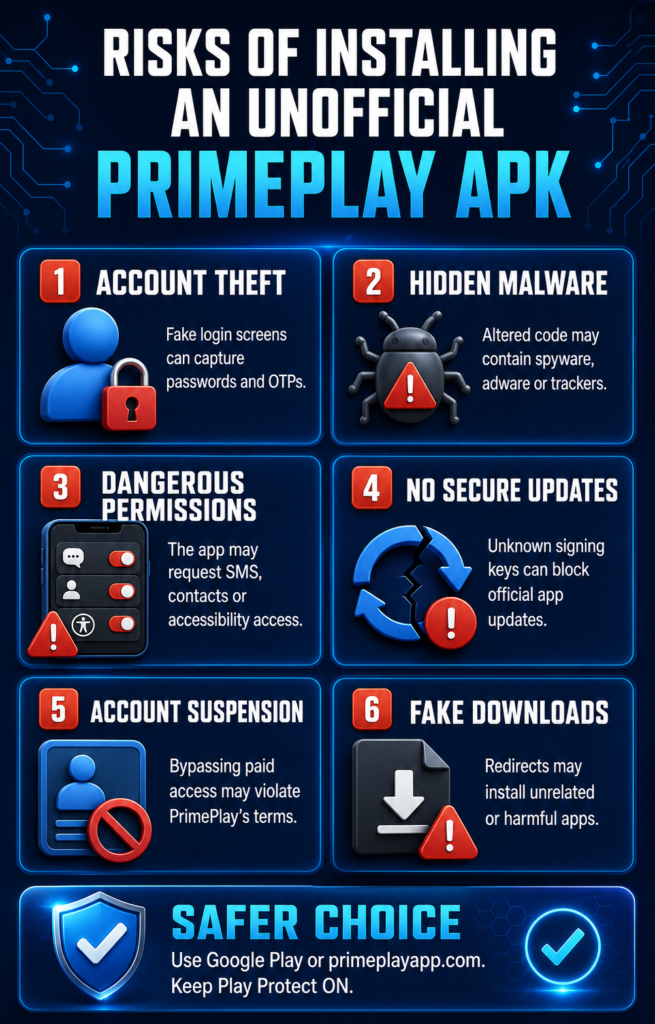
An altered login screen can collect the email address, phone number, password, or one-time code entered into it. If you reuse a password, a leak may affect more than PrimePlay.
Never enter a Google password, payment PIN, card details, or banking information into an unofficial streaming app.
Unexpected Permissions and Data Access
A video app may reasonably need network and media-related access. However, requests for SMS, contacts, call logs, accessibility control, device administration, or notification reading deserve close scrutiny. These permissions can expose private information or give an app more control than streaming requires.
Google Play Protect checks Play Store apps before download and scans devices for potentially harmful apps from other sources. Google recommends keeping it enabled. It may warn about, disable, remove, or block an unsafe or unverified application.
A page telling you to turn Play Protect off is asking you to remove a security layer and is a clear reason to stop.
No Dependable Security Updates
Official updates can fix bugs and security flaws. A mod relies on an unknown maintainer to rebuild and redistribute each release.
Updates may arrive late, use another certificate, or disappear. An outdated streaming app can also stop working when the service changes its login or playback system.
Subscription and Legal Problems
The PrimePlay Terms of Use prohibit unauthorised access, copying, reverse engineering, hacking, and attempts to bypass platform security.
The terms say violations may lead to account suspension and, in some cases, legal action. A file advertised specifically to bypass a paid subscription may conflict with those conditions and the rights of the platform or its licensors.
Official App Versus Mod APK
| Checkpoint | Official PrimePlay | Unofficial mod APK |
|---|---|---|
| Source | Google Play or PrimePlay’s domain | Third-party file host or mod site |
| Publisher | Identified on the store page | Modifier may be unknown |
| Signing and updates | Managed through the official release channel | May use a different certificate and update route |
| Premium access | Purchased through a stated plan | “Unlocked” status is unverified |
| Privacy information | Store disclosure and official privacy policy | May not describe the altered code |
| Support | Publisher contact is available | Support may be limited to comments or a chat channel |
| Risk level | Lower when installed from the verified listing | Higher because code provenance is unclear |
The Safer and Often Cheaper Way to Watch
If cost is the main reason you searched for a PrimePlay premium mod APK, compare the official plan periods before choosing.
PrimePlay’s subscription page displayed the following prices when checked on July 21, 2026:
| Plan | Displayed price | Approximate cost per month |
|---|---|---|
| 1 month | ₹399 | ₹399.00 |
| 2 months | ₹599 | ₹299.50 |
| 3 months | ₹799 | ₹266.33 |
| 6 months | ₹999 | ₹166.50 |
| 1 year | ₹1,499 | ₹124.92 |
The longer plan has the lowest monthly equivalent, but only makes sense if you will use it. Prices, catalogues, taxes, rules, and promotions can change.
PrimePlay’s terms state that subscriptions renew automatically unless cancelled before renewal. Therefore, check the payment and renewal screens before purchasing.
Use this simple decision guide:
- Want to try the service? Start with the shortest official option or any preview content offered on the official site.
- Plan to watch for several months? Compare the total cost of the two-, three-, and six-month plans instead of looking only at the upfront amount.
- Cannot find the app in your region? Use the official website or contact support@primeplayapp.com. Do not replace a missing store listing with the first APK result.
- Need iPhone access? APK files do not run on iOS. Use a verified App Store listing or PrimePlay’s official website.
- A page asks you to disable security? Leave the page and do not install the file.
What to Do If You Already Installed a PrimePlay Mod APK
Do not panic, but act before using the app again.
- Disconnect the app from active use and uninstall the unofficial package.
- Open Google Play Store, select your profile, choose Play Protect, and run a scan. Keep “Scan apps with Play Protect” enabled.
- Go to Android Settings and remove “Install unknown apps” permission from the browser, messaging app, or file manager used for the installation.
- Review recently installed apps and remove anything you do not recognise.
- Check camera, microphone, SMS, notification, accessibility, storage, and device-admin permissions for unexpected access.
- If you entered a password, change it from a trusted device. Change reused passwords as well, and enable multi-factor authentication where available.
- Review Google Play, bank, card, and UPI activity if you entered payment information or approved unusual prompts.
- Install Android security updates and download PrimePlay again only through its verified listing if you still want the app.
If the phone shows persistent pop-ups, unusual data use, unknown installations, or blocked security settings, back up personal files and seek help from the manufacturer or a qualified technician.
How This Guide Was Checked
ScoopUpdates compared claims on ranking APK pages with PrimePlay’s official pages, Google Play listing, Play Protect guidance, and Android’s app-signing documentation.
We did not install or distribute a third-party PrimePlay package.
Final Verdict
A PrimePlay Mod APK may promise free premium access, no ads, offline viewing, or 4K streaming, but those promises do not establish authenticity or safety.
Conflicting version numbers, unknown signing identities, unclear update routes, and requests to bypass subscription controls create risks that a free download is unlikely to justify.
Use the official app or website. Keep Play Protect active, review permissions, and pay only through a verified PrimePlay page. If an official plan does not suit your budget, waiting for a promotion or using another licensed service is safer than trusting an altered APK with your phone, account, and personal data.